
About This Guide
NOT SOFTWARE.
A SYSTEM.
TotalSheet is not conventional software — it is a deterministic, engineering-driven construction execution system.
This learning center provides step-by-step interface walkthroughs for every module, covering estimation, planning, and execution from project creation to final report.
It enables a shift from manual, error-prone workflows to a precise, data-driven construction management system — traceable, auditable, and 100% mathematically accurate.
01

Project Portfolio
Centralized Project Management Dashboard
Key Functionalities
-
Create New Project — Initialize and configure new project entries
-
Project Listing — View all projects with essential details (name, type, location)
-
Search & Filter — Quickly locate specific projects
-
Project Actions — Edit, manage, or remove project records
-
Project-Wise Reports — Access detailed reports for each project
Page Description :
The Project Portfolio page serves as the central hub for managing all construction projects within TotalSheet. It provides a structured and organized view of both active and completed projects, enabling users to efficiently access, monitor, and control project data. Each project is presented with key details such as project name, type, and location, ensuring clarity and quick identification. Users can create new projects with defined parameters, manage existing project records, and perform actions such as editing or organizing project data. The integrated search and filtering functionality allows users to quickly locate specific projects, improving navigation efficiency, especially when handling multiple projects. Additionally, the page supports project-wise reporting, enabling users to analyze project-level data and gain insights into execution and performance. Acting as the entry point of the TotalSheet workflow, this page establishes the foundation for all downstream processes including estimation, cost analysis, billing, and reporting, ensuring structured and scalable project management.
02
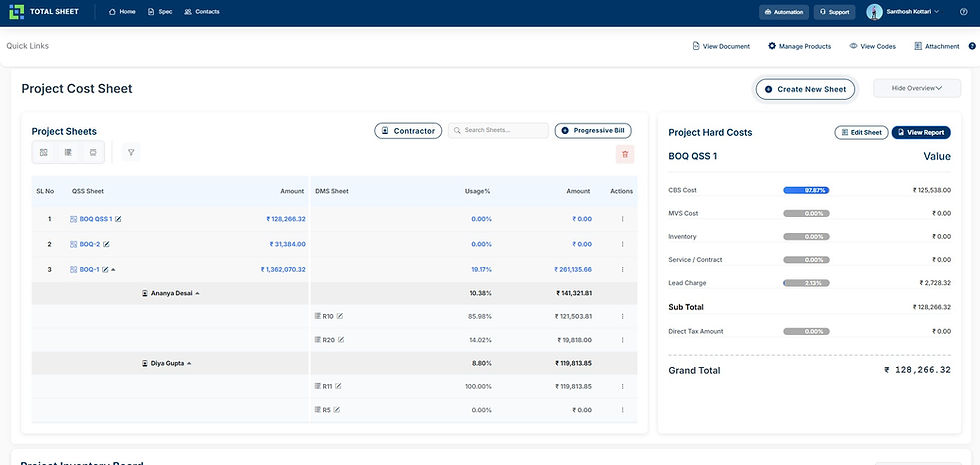
Project Cost Sheet
Structured Cost Analysis & Financial Control Dashboard
Key Functionalities
-
Create New Sheet — Initialize and manage new cost sheets for projects
-
BOQ (QSS) Management — Organize and track multiple BOQ cost sheets
-
Usage Tracking — Monitor usage percentage and cost allocation
-
Contractor & Billing Integration — Link contractor data and progressive billing
-
Cost Summary & Reports — View real-time cost breakdown and project totals
Page Description :
The Project Cost Sheet page provides a centralized platform for managing and analyzing project costs within TotalSheet. It enables users to organize multiple BOQ (QSS) sheets, track cost allocation, and monitor financial performance in a structured manner. Each sheet captures detailed cost information, including usage percentages, allocated amounts, and contractor-level distribution, ensuring transparency across all cost components. Users can create new cost sheets, manage existing ones, and integrate contractor and billing data directly into the system. The page also provides real-time insights into cost distribution through structured summaries such as CBS cost, service cost, and additional charges, allowing better financial control. With built-in reporting and overview panels, users can quickly assess project financial status, identify deviations, and make informed decisions. This page plays a critical role in connecting estimation, execution, and billing, ensuring accurate cost governance and streamlined project financial management.
03

Specification Code Creator (CBS Code Wizard)
Structured Rate Analysis & Specification Builder
Key Functionalities
-
Specification Setup — Define group, subgroup, unit, and spec code
-
Material Cost Structuring — Add materials with rate, unit, and ratio
-
Execution Cost Modeling — Configure labor and machinery with productivity
-
Operational Cost Allocation — Apply overheads using structured formulas
-
Management Cost & Final Pricing — Define margins and compute total cost
Page Description :
The Specification Code Creator page is a core module in TotalSheet designed to build structured rate analysis and define detailed construction specifications. It enables users to create CBS-based cost structures by systematically organizing materials, execution resources, operational expenses, and management components into a unified framework. Users can define specification parameters such as group, subgroup, unit, and spec code, ensuring standardized classification across projects. The page allows precise input of material quantities, rates, and ratios, along with execution elements such as labor and machinery productivity. Operational and administrative costs can be applied through predefined formulas, ensuring accurate allocation of indirect expenses. The system automatically calculates basic values, taxes, and final totals, providing complete transparency and traceability. This structured approach ensures consistency, eliminates estimation errors, and forms the foundation for accurate BOQ generation, cost control, and financial governance within construction projects.
04

BOQ Creator
Structured Bill of Quantities & Cost Integration
Key Functionalities
-
BOQ Item Creation — Add and organize work items with structured codes
-
CBS/MVS/Inventory Integration — Link cost codes directly to BOQ items
-
Quantity & Rate Management — Define quantities, units, and unit rates
-
Auto Cost Calculation — Generate total, base amount, and tax values
-
Section-wise Organization — Structure BOQ by floors, zones, or phases
Page Description :
The BOQ Creator page is a core module in TotalSheet used to generate and manage structured Bills of Quantities for construction projects. It allows users to define work items, assign CBS, MVS, or inventory codes, and organize them into logical sections such as floors or work phases. Each BOQ item captures key parameters including quantity, unit, and unit rate, ensuring accurate and standardized estimation. The system automatically calculates total amounts, base values, and applicable taxes, providing real-time financial visibility. By integrating directly with the specification and cost structure modules, the BOQ ensures consistency between estimation and execution. Users can manage timelines, reorder items, and generate reports, enabling better planning and control. This page serves as the bridge between detailed rate analysis and project execution, ensuring that all quantities and costs are structured, traceable, and aligned with real construction workflows.
04-A

DMS Sheet (Detailed Measurement Sheet)
Day-to-Day Site Activity & Measurement Management
Key Functionalities
-
Daily Work Recording — Capture day-to-day site activities and measurements
-
Quantity Calculation — Record dimensions and auto-calculate quantities
-
Material & Execution Demand — Track daily material and labor requirements
-
BOQ Integration — Link site activities directly with BOQ items
-
Real-Time Cost Impact — Monitor cost implications of daily execution
Page Description :
The DMS Sheet (Detailed Measurement Sheet) page is designed to manage day-to-day site activities and capture accurate execution data within TotalSheet. It enables users to record detailed measurements, including dimensions and quantities, ensuring that all work performed on-site is systematically documented and traceable. Users can log material demand, execution requirements, and daily work progress, linking each activity directly to BOQ items and cost structures. The system automatically calculates quantities based on inputs and reflects their financial impact in real time, ensuring alignment between site execution and project costing. By maintaining structured daily records, the DMS Sheet improves transparency, supports accurate billing, and reduces discrepancies between planned and executed work. It serves as a critical bridge between on-site operations and financial control, enabling precise tracking of project progress and resource utilization.
04-B

QSS & DMS Abstract Summary
Quantity Summary, Cost Consolidation & Tax Calculation
Key Functionalities
-
Quantity Summary — Consolidate quantities from DMS into QSS
-
Cost Aggregation — Summarize floor-wise and section-wise values
-
Lead & Charge Calculation — Apply lead percentages and additional costs
-
Tax Computation — Calculate GST, input credit, and net payable
-
Final Cost Summary — Generate base amount, tax, and grand total
Page Description :
The QSS & DMS Abstract Summary page provides a consolidated view of quantities, costs, and tax calculations within TotalSheet. It aggregates data from the Detailed Measurement Sheet (DMS) into the Quantity Summarised Sheet (QSS), enabling users to view section-wise and floor-wise cost summaries in a structured format. The system calculates lead charges, additional percentages, and integrates them into the overall cost structure. It further applies tax computations based on defined norms, including GST, input tax credit, and net tax payable, ensuring accurate financial representation. Users can view base amounts, tax values, and the final grand total in a clear and traceable format. This page acts as the final financial summary layer, connecting estimation, execution, and taxation into a unified output, ensuring complete transparency and compliance in project costing.
05

Project Schedule & Cashflow Manager
Automated Planning, Execution Timeline & Cashflow Control
Key Functionalities
-
Schedule Planning — Define task duration, start, and end timelines
-
BOQ Integration — Link schedule directly with BOQ items and costs
-
Cashflow Tracking — Monitor daily/weekly financial flow automatically
-
Progress Mapping — Track execution status across timeline grid
-
Delay & Impact Visibility — Identify delays and financial impact instantly
Page Description :
The Project Schedule & Cashflow Manager page enables automated planning and financial tracking of construction projects within TotalSheet. It integrates project timelines with BOQ items, allowing users to define task durations, start and end dates, and execution sequences in a structured format. Each activity is mapped across a calendar-based grid, providing clear visibility into project progress and scheduling. The system automatically links cost data with the execution timeline, enabling real-time cashflow tracking based on work progress. Users can monitor financial distribution across days, weeks, and project phases, ensuring better control over budgets and resource allocation. Any delays or changes in execution are instantly reflected in both schedule and financial impact, allowing proactive decision-making. This page bridges planning, execution, and finance, transforming project management into a synchronized, data-driven system with complete visibility and control.
06

Progressive Bill Report & Analyzer
Automated Running Bill Tracking & Financial Analysis
Key Functionalities
-
Billing Progress Tracking — Monitor executed, remaining, and exceeded quantities
-
BOQ Integration — Link billing directly with BOQ items and cost values
-
Contractor-wise Analysis — Track execution and billing per contractor
-
Real-Time Financial Insights — View billed amount, balance, and variance
-
Performance Indicators — Visualize progress using percentage-based analytics
Page Description :
The Progressive Bill Report & Analyzer page provides a comprehensive view of running bills and execution progress within TotalSheet. It enables users to track project billing against BOQ values by comparing executed quantities, remaining work, and any exceeded quantities in real time. Each line item is directly linked to its respective CBS or MVS code, ensuring complete traceability between estimation and execution. The system integrates contractor-level data, allowing users to monitor performance, billing status, and work completion across different stakeholders. Visual indicators such as percentage bars and progress metrics provide quick insights into execution efficiency and financial status. Users can analyze billed amounts, identify deviations, and evaluate project performance with clarity. This page ensures transparency in billing, reduces disputes, and strengthens financial control by aligning execution data with structured BOQ and cost frameworks.
07

Contractor Running Bill Statement
Contractor-wise Quantity & Amount Tracking Statement
Key Functionalities
-
Contractor-wise Billing — Track quantities and amounts per contractor
-
Quantity Tracking — Monitor executed quantities against BOQ
-
Bill-wise Distribution — View billing across multiple bill cycles (R1, R2, etc.)
-
Usage Analytics — Analyze percentage-based execution and consumption
-
Consolidated Statement — Get total quantity and amount summary
Page Description :
The Contractor Running Bill Statement page provides a detailed view of quantity and amount tracking for each contractor within a project. It enables users to monitor executed quantities against BOQ values and analyze how work is distributed across multiple billing cycles such as R1, R2, and subsequent stages. Each line item is linked to CBS or MVS codes, ensuring complete traceability between estimation, execution, and billing. The system displays usage percentages, executed quantities, and billed amounts in a structured format, allowing users to evaluate contractor performance and billing accuracy. It also provides a consolidated summary of total quantities and financial values, helping identify deviations and ensure transparency. By offering clear, contractor-wise insights, this page strengthens financial control, improves billing validation, and supports accurate project-level decision-making within the TotalSheet system.
08
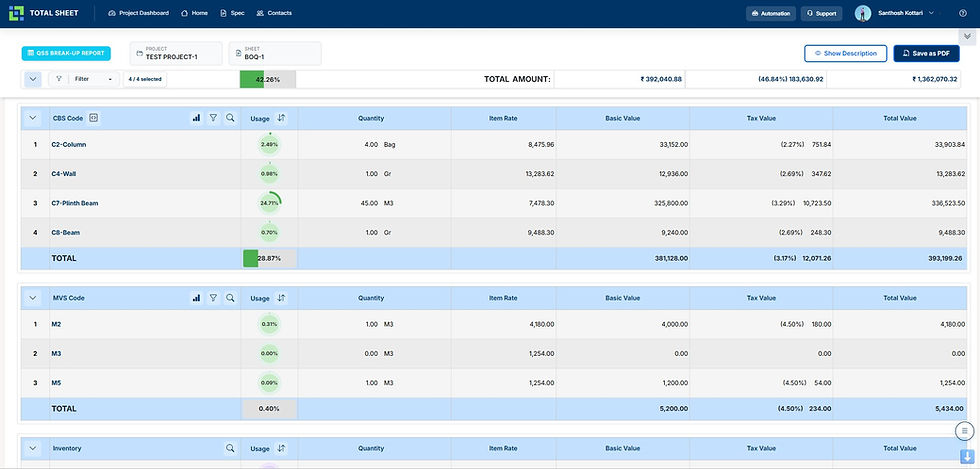
BOQ Abstract Report
BOQ-Based Quantity & Cost Summary Report
Key Functionalities
-
Quantity Aggregation — Summarize total quantities across BOQ items
-
Cost Consolidation — View item-wise and total cost values
-
CBS/MVS/Inventory Split — Analyze data by cost categories
-
Usage Analytics — Track percentage-based consumption
-
Export & Reporting — Generate reports and download as PDF
Page Description :
The BOQ Abstract Report page provides a consolidated summary of quantities and costs derived from the BOQ within TotalSheet. It aggregates item-wise data across CBS, MVS, and inventory categories, offering a clear view of total quantities, item rates, basic values, tax values, and final amounts. This structured report enables users to analyze how individual BOQ items contribute to overall project cost and quantity distribution. The system also displays usage percentages, helping users understand the relative weight of each item within the total project scope. By organizing data into categorized sections, the report improves readability and supports quick analysis of material, execution, and inventory components. Users can filter data, view detailed breakdowns, and export reports for documentation or presentation. This page plays a critical role in cost validation, project review, and decision-making by providing a complete and transparent overview of BOQ-based quantities and financials.
09

BOQ Cost Breakup Report
Material, Execution, Operational & Management Cost Analysis
Key Functionalities
-
Material Consumption Analysis — Track material quantities and cost contribution
-
Execution Cost Tracking — Monitor labor and machinery cost distribution
-
Operational Cost Allocation — Analyze overhead and support cost components
-
Management Cost Breakdown — Evaluate margins and administrative costs
-
Usage-Based Insights — View percentage contribution across all cost layers
Page Description :
The BOQ Cost Breakup Report page provides a detailed analysis of cost distribution across different components of a construction project within TotalSheet. It categorizes costs into material, execution, operational, and management sections, offering a complete breakdown of how project costs are structured and consumed. Users can track material quantities, item rates, and total values, along with percentage-based usage to understand the contribution of each component. The execution section captures labor and machinery costs, while operational and management sections represent overheads, support functions, and administrative margins. The system presents all data in a structured and transparent format, enabling users to analyze cost behavior, identify inefficiencies, and validate financial allocations. This report plays a critical role in ensuring cost accuracy, improving financial control, and supporting data-driven decision-making across construction projects.
10

Project Inventory & Expense Tracker
Material, Execution & Expense Recording with Usage Analysis
Key Functionalities
-
Inventory Recording — Log material entries with supplier and invoice details
-
Expense Tracking — Record execution and management costs systematically
-
Supplier & Contractor Mapping — Link transactions to responsible parties
-
Quantity & Cost Monitoring — Track quantities, rates, and total amounts
-
Usage Analysis — Analyze consumption and cost distribution across project
Page Description :
The Project Inventory & Expense Tracker page enables structured recording and monitoring of all project-related materials, execution activities, and management expenses within TotalSheet. It captures detailed transaction-level data including material type, supplier, contractor, invoice date, received date, quantity, and financial values such as basic amount, tax, and total cost. The system organizes data into separate sections for material inventory, execution costs, and management expenses, ensuring clear classification and traceability. Users can filter, analyze, and track consumption patterns and cost distribution across different project components. By maintaining real-time records of all inflows and expenditures, this page provides complete visibility into resource utilization and financial flow. It supports accurate cost validation, reduces discrepancies, and strengthens overall project financial governance through structured data management and usage analysis.
Ready to Get TotalSheet Certified?
Walk into any Training Centre across India and ask for the TotalSheet training module. Or contact us at support@totalsheet.app to check availability in your city and get enrolled with a partner discount on your TotalSheet subscription.